It can use a computer.
Research in a browser, work with files, and run tasks on connected Orgo Linux desktops. With Codex set up, it can also work on your Mac.
 Better than
SELF-HOSTED AI. FULL SEND.
Meet Better than GrokBot. An AI team for the business you’re building. Set the instructions, choose the models, and decide how deeply your agents think. Then see what they actually do.
macOS app · Bring your own API keys · No software subscription
Illustrative workflow. Your results depend on the task and model.
THE UPGRADE IS CONTROL
Keep the coordinator on your Mac. Connect your accounts. Give your agents the tools they need.
Research in a browser, work with files, and run tasks on connected Orgo Linux desktops. With Codex set up, it can also work on your Mac.
Use your own provider keys. Choose OpenRouter models for chat and tasks, and set model preferences for each agent.
Your coordinator, chat history, and settings live locally. Connected providers handle the tasks and data you send to them.
ACTUAL APP. ACTUAL CONTROLS.
These are captures from the running app. Real agent settings, cropped to keep conversations and account details out of the picture.
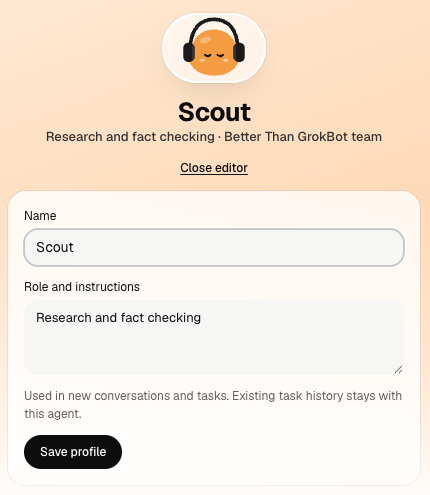
Edit its role and instructions in the app. For deeper changes, inspect and modify the coordinator’s system prompt in source.
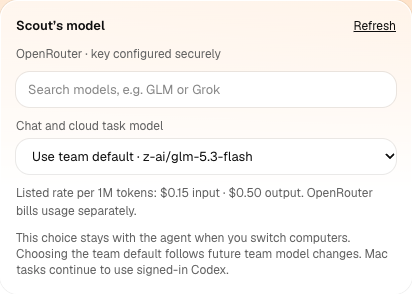
Use your own OpenRouter key. Search the model catalog, see listed token rates, and keep the model choice with the agent.
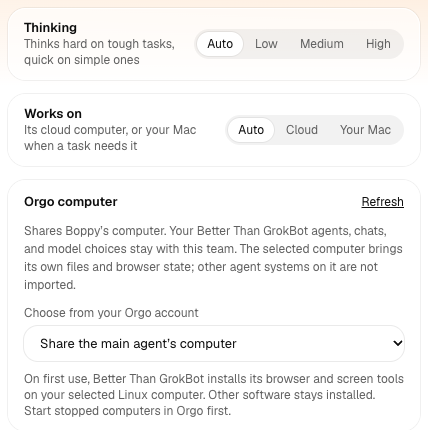
Choose Auto, Low, Medium or High task thinking. Choose where it works, too. Reasoning support depends on the model and provider; Mac tasks use Codex.
Captured October 9, 2026 · Click any screenshot to inspect it · The displayed model and rates are examples from this installation.
WHEN THE WORK MATTERS
A prospect list needs evidence. A proposal needs review. A failed task needs an explanation. Build a team with clear jobs, explicit instructions, and a process you can inspect and improve.
WHY BETTER THAN GROKBOT?
“Better” means more ownership for people who want to operate and adapt their own agent system. Here’s the practical difference.
| What matters | Better than GrokBot Self-hosted by you | Grok Bot Managed by its provider |
|---|---|---|
| Software cost | $0 software subscription. Pay your own AI, computer and integration usage. | Paid access. SuperGrok lists $30/month with Bot access; other linked plans exist. Usage limits apply. Pricing ↗ |
| See inside the runtime | Download the coordinator source. Read the prompts, tool definitions, task routing and recovery logic. | You use the provider’s hosted runtime. Its Bot docs describe operating the product, rather than downloading and self-hosting that runtime. |
| Change the “soul” | Edit agent roles in the app. Modify underlying system instructions in source, then rebuild your fork. | Bot descriptions support lasting rules and responsibilities. That is different from editing the underlying orchestration code. Bot profiles ↗ |
| Models & reasoning | Per-agent OpenRouter model selection and task thinking controls. Provider support still determines the available reasoning behavior. | A managed model experience. The reviewed Bot docs do not specify equivalent per-agent OpenRouter model selection or editable runtime reasoning configuration. |
| Tools & boundaries | Inspect tool schemas and approval logic. Configure connected apps and computers; extend the tool code yourself. | Connectors, computer use, skills and approval controls are documented. The provider operates the underlying implementation. Tools ↗ |
| Work as a team | Agents have roles and their own conversations. The coordinator can hand off tasks and ask teammates about their work. | Also supports coordinating bots and group chats. Our advantage is the ability to inspect and adapt the coordination process. Overview ↗ |
| When something breaks | Read local logs, inspect persisted task state, reproduce the failure, and change the implementation. | Use the provider’s troubleshooting guidance, status information and support. You don’t operate its hosted backend. |
Comparison checked October 9, 2026 against the linked public Bot documentation. Features and prices can change. An undocumented control is not proof it does not exist. Grok Bot also offers team and enterprise features; this is a comparison of operator control, not a claim that it is personal-use only.
MAKE DELIBERATION PART OF THE JOB
Set up a researcher, a reviewer, and an owner. Give each a written charter. Ask them to check sources, challenge assumptions, and bring you a decision you can review.
An example operating process you configure, not an automatic consensus feature. More thinking does not guarantee correctness.
Collect sources. Separate facts from assumptions. Explain what is still unknown.
Check the evidence. Flag gaps and tradeoffs. Ask the researcher about its own work.
Bring the findings together. Show the reasoning and leave consequential actions for approval.
OWN THE OPERATION
When an agent stalls, guessing is expensive. An inspectable coordinator gives you somewhere to start.
Look at task history, logs and the source path that made the call. Check whether the problem is the model, a login, a tool or your configuration.
Adjust instructions, select a different model, change task thinking, or patch the tool implementation. You can rebuild your own fork.
You manage updates, uptime, backups and keys. Provider outages and model limits still apply. Self-hosting gives you control, not an uptime guarantee.
FREE TO DOWNLOAD. YOURS TO RUN.
Drop the link in Claude Code or Codex.
Let your coding agent handle the install.
GitHub repo & download instructions ↗
AI, Orgo computers, and optional integrations may cost extra.
Free self-hosting under the included FSL license.
Drop the link in Claude Code or Codex. The app self-installs. While you’re knocking out the startup checklist, within 30 minutes you’re up and running with better software for a fraction of the cost.
https://github.com/jbellsolutions/better-than-grokbot
Your coding agent performs the installation. Thirty minutes is a setup target with accounts and prerequisites ready. Software is free; total cost depends on your model, computer and integrations.
The software download and personal self-hosting are free under FSL-1.1-ALv2. AI providers, cloud computers, email and phone services have their own charges. The license restricts competing commercial hosted services.
You can inspect, modify and self-host the downloaded coordinator under FSL-1.1-ALv2. This is fair-source licensing, with restrictions on competing commercial hosted services. Connected AI models and the optional upstream relay helper have their own terms and access requirements.
No. Total cost depends on your models, task volume, computers and integrations. You operate the coordinator and its updates. The advantage is control over the implementation and a way to diagnose problems; there is no measured reliability advantage or guaranteed saving.
The native app is built for Apple silicon Macs. Developers can also run the Next.js coordinator from source; Mac computer use and login services require macOS.
Node.js 24+, Git, and your own AI provider key. For cloud computer tasks, connect an Orgo account and desktop. Mac tasks require a separate Codex setup. Optional integrations need their own accounts.
No. Better than GrokBot is an independent project based on Bops. “Better” refers to the control and ownership described above, not a measured speed or reliability benchmark. We are not endorsed by xAI, Grok, or the original Bops team.